
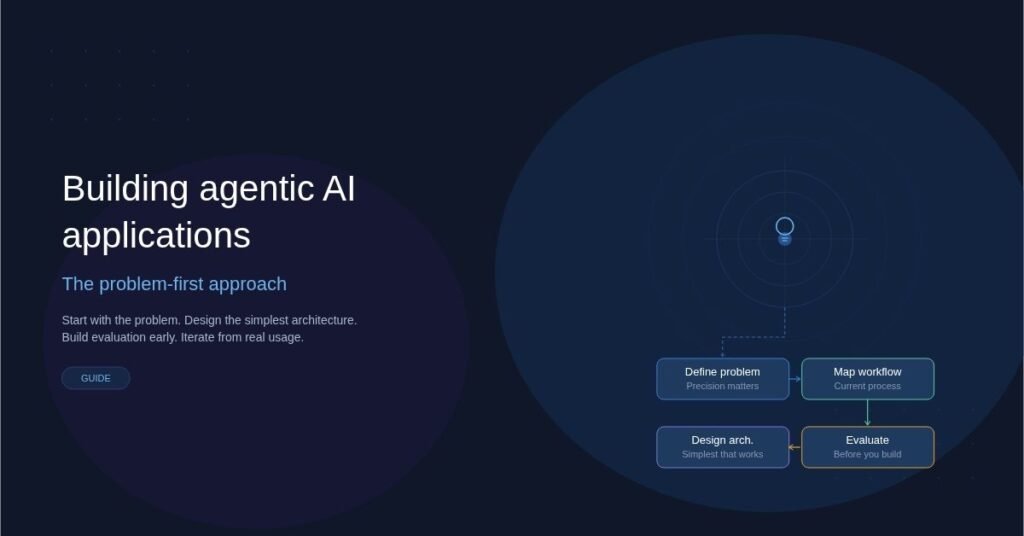
The AI industry is flooded with tools, frameworks, and agent platforms. New ones launch every week. But here’s what separates teams that ship real value from those that burn through budgets chasing hype: the best agentic AI applications start with a clear problem, not a shiny technology.
A problem-first approach means you define what needs to be solved before you decide how AI agents should solve it. It sounds obvious. In practice, most teams do the opposite — they pick an agent framework, then go looking for problems to justify it.
This article breaks down how to build agentic AI applications the right way, starting from the problem and working toward the right architecture.
What Is an Agentic AI Application?
An agentic AI application is software where one or more AI models act autonomously to complete tasks. Unlike a simple chatbot that answers one question at a time, an agentic system can plan, use tools, make decisions, and take multi-step actions with minimal human oversight.
Think of the difference this way:
- Traditional AI: You ask a question, you get an answer.
- Agentic AI: You describe a goal, and the system figures out the steps, executes them, handles errors, and delivers a result.
Examples include AI systems that research a topic across multiple sources and write a report, code assistants that debug across files and run tests autonomously, and customer support agents that resolve tickets end-to-end by pulling account data, checking policies, and issuing refunds.
The “agentic” part is autonomy. The agent decides what to do next based on its understanding of the goal.
Why Problem-First Matters More Than Ever
The current landscape makes it dangerously easy to start with the technology. Open-source agent frameworks, hosted agent platforms, and pre-built tool integrations lower the barrier to building something. But low barriers to building don’t mean low barriers to building something useful.
Here’s why starting with the problem is critical.
Most AI Agent Projects Fail at Value, Not Technology
The number one reason agentic AI projects stall isn’t a technical limitation. It’s that the team built an impressive demo that doesn’t solve a real workflow problem. When you start by asking “what can agents do?” instead of “what problem costs us the most time and money?”, you optimize for novelty instead of impact.
Agents Add Complexity
Every agent loop introduces latency, cost, and unpredictability. A multi-agent system with tool calls, memory, and planning steps is significantly harder to debug, test, and maintain than a simple prompt-response flow. That complexity is justified only when the problem genuinely requires autonomy.
Users Don’t Care About Agents
End users care about outcomes. They want faster ticket resolution, cleaner data pipelines, or better research summaries. Whether your solution uses one agent, five agents, or zero agents is irrelevant to them. Starting from the problem keeps you focused on what the user actually needs.
How to Apply a Problem-First Approach
Here’s a practical framework for building agentic AI applications that deliver real results.
Step 1: Define the Problem With Precision
Don’t start with “we want to use AI agents.” Start with a specific, measurable problem statement.
Bad: “We want an AI agent to help our sales team.”
Good: “Our sales team spends 6 hours per week manually researching prospects across LinkedIn, Crunchbase, and internal CRM data before outreach calls. We want to reduce that to under 30 minutes.”
The good version tells you the workflow, the pain point, the data sources involved, and what success looks like. It also tells you whether an agentic approach is even necessary — or whether a simpler pipeline would do the job.
Step 2: Map the Current Workflow
Before designing any agent, document how the task is done today. Walk through each step a human takes. Identify where decisions are made, what tools are used, and where things break down.
Questions to answer at this stage:
- What triggers this workflow?
- What data does the person need to access?
- What decisions require judgment versus following rules?
- Where do errors or delays happen most?
- What does “done well” look like?
This map becomes your blueprint. Every step a human takes is a candidate for agent automation — but not every step should be automated.
Step 3: Decide What Needs Autonomy
This is the step most teams skip. Not every part of a workflow benefits from an autonomous agent. Some parts are better handled by deterministic code, simple API calls, or a single LLM prompt.
Use this rule of thumb:
- Use deterministic code when the logic is predictable and rule-based. Parsing a CSV, applying a discount formula, or routing a request based on category doesn’t need an agent.
- Use a single LLM call when you need natural language understanding or generation for one isolated step. Summarizing a document or classifying an email works fine without agentic loops.
- Use an agent when the task requires multi-step reasoning, dynamic tool selection, or adapting a plan based on intermediate results. Researching a topic across multiple databases, deciding which sources to trust, and synthesizing findings into a report — that’s where agents earn their complexity.
Being selective about where you deploy agents keeps your system faster, cheaper, and easier to maintain.
Step 4: Design the Simplest Agent Architecture That Works
Once you know which parts of the workflow need agentic behavior, design the lightest architecture that solves the problem.
Common patterns, ordered by complexity:
- Single agent with tools: One LLM with access to a defined set of tools (search, database queries, APIs). It plans and executes a sequence of tool calls to complete the task. This handles the majority of real-world agentic use cases.
- Router agent: A lightweight agent that classifies the request and hands it off to a specialized sub-agent or pipeline. Useful when the problem has clearly distinct categories that require different handling.
- Multi-agent collaboration: Multiple agents with different roles work together, passing context between them. Only justified for genuinely complex workflows where a single agent would struggle to maintain coherent context across all responsibilities.
Start with the simplest pattern. You can always add complexity later. You can rarely remove it.
Step 5: Build Evaluation Before You Build the Agent
This is the most underrated step in agentic AI development. Before writing agent code, define how you’ll measure whether the agent is doing a good job.
Create a set of test cases based on real examples from your workflow mapping in Step 2. For each test case, define what a good output looks like. Then build automated evaluation that checks agent outputs against these benchmarks.
Evaluation criteria should include correctness of the final output, whether the agent used the right tools in a reasonable sequence, latency and cost per task, and how gracefully the agent handles edge cases and errors.
Without evaluation, you’re guessing whether your agent works. With it, you can iterate confidently.
Step 6: Iterate Based on Real Usage
Deploy to a small group of real users. Watch how they interact with the system. Pay attention to where the agent fails, where users override it, and where it adds unexpected value.
The best agentic applications are refined through this feedback loop, not designed perfectly upfront. Each iteration should tighten the problem definition, improve tool selection, and sharpen evaluation criteria.
Common Mistakes to Avoid
Even with a problem-first mindset, teams run into predictable pitfalls.
Over-engineering the agent graph. If your architecture diagram looks like a subway map, you’ve probably over-complicated things. Most production agentic systems are simpler than conference talks suggest.
Ignoring latency and cost. Each agent step involves an LLM call, which adds latency and cost. A multi-agent system that takes 45 seconds and costs $0.50 per run might not be acceptable for a real-time customer support use case. Model these constraints early.
Skipping human-in-the-loop design. For high-stakes decisions — approving refunds, sending external communications, modifying production data — build in human review checkpoints. Full autonomy isn’t always the goal.
Treating memory as an afterthought. Agents that forget context between runs frustrate users. If your workflow requires the agent to remember prior interactions or build on previous work, design the memory system upfront.
Chasing the newest framework. Agent frameworks evolve fast. Picking one because it’s trending this month leads to migration headaches when something newer arrives. Choose frameworks based on your specific requirements, community stability, and how well they match the architecture you’ve designed.
A Real-World Example: Automating Due Diligence Research
Consider a venture capital firm where analysts spend 10-15 hours per deal conducting due diligence research. They search public databases, read SEC filings, analyze competitor landscapes, and compile everything into a standardized memo.
A problem-first approach would look like this:
Problem: Due diligence research takes too long and delays deal decisions. Analysts spend most of their time on data gathering rather than analysis.
Workflow map: The analyst receives a company name, searches five to eight specific databases, extracts key financial and operational metrics, identifies competitors, and writes a structured memo following a company template.
Autonomy decision: Data gathering across databases is a good fit for agentic automation. The final analysis and recommendation still benefits from human judgment.
Architecture: A single agent with tools for each database, a structured output format matching the memo template, and a human review step before the memo is finalized.
Evaluation: Compare agent-generated memos against analyst-written memos for the same companies. Measure accuracy of extracted data points, completeness of competitor analysis, and time saved.
The result is a system that cuts research time from 12 hours to 2 hours, with the analyst spending their time on high-value analysis instead of copy-pasting data between tabs.
Choosing the Right Tools and Frameworks
Your tool choices should follow from your architecture decisions, not the other way around. Here are some practical considerations.
Pick an LLM that matches your accuracy and latency needs. Larger models reason better but cost more and respond slower. For many agent tasks, a mid-tier model with good tool-calling support is the right balance.
Choose a framework that doesn’t lock you in. The best agent frameworks let you swap models, add or remove tools, and adjust the agent loop without rewriting everything. Prefer thin orchestration layers over opinionated platforms that make assumptions about your workflow.
Invest in observability from day one. Agentic systems are harder to debug than traditional software. Logging every agent decision, tool call, and intermediate result is essential. You can’t improve what you can’t see.
Conclusion
Building agentic AI applications that actually work comes down to discipline. Start with a real problem. Map the workflow. Be selective about where you use agents. Design the simplest architecture that solves the problem. Build evaluation early. Iterate based on real usage.
The teams that succeed with agentic AI aren’t the ones using the most advanced frameworks or the most agents. They’re the ones who understand the problem deeply enough to know exactly where autonomy helps — and where it doesn’t.
Technology should serve the problem. Not the other way around.

George is a digital growth strategist and the driving force behind Business Ranker, a platform dedicated to helping businesses improve their online visibility and search engine rankings. With a strong understanding of SEO, content strategy, and data-driven marketing, George works closely with brands to turn traffic into real, measurable growth.